Attaching HCP Vault to Your Existing AWS Transit Gateway: The Missing Account Number
Overview
This blog post focuses on an undocumented challenge I ran into during the deployment. I led a project last year to deploy a new private instance of HCP Vault for the security team at a remote customer site. You might be asking, “What is “HCP Vault”? It’s HashiCorp’s managed service offering for Vault Enterprise. The client was an AWS shop, so naturally they selected HCP Vault on AWS. Not to be confused with the client’s AWS environment; HCP Vault runs on AWS infrastructure managed by HashiCorp and is an abstraction from a customer point of view as you don’t manage the underlying AWS resources. The project was implemented with IaC using Terraform, however I am unable to share code snippets due to obvious reasons.
Connectivity Requirement
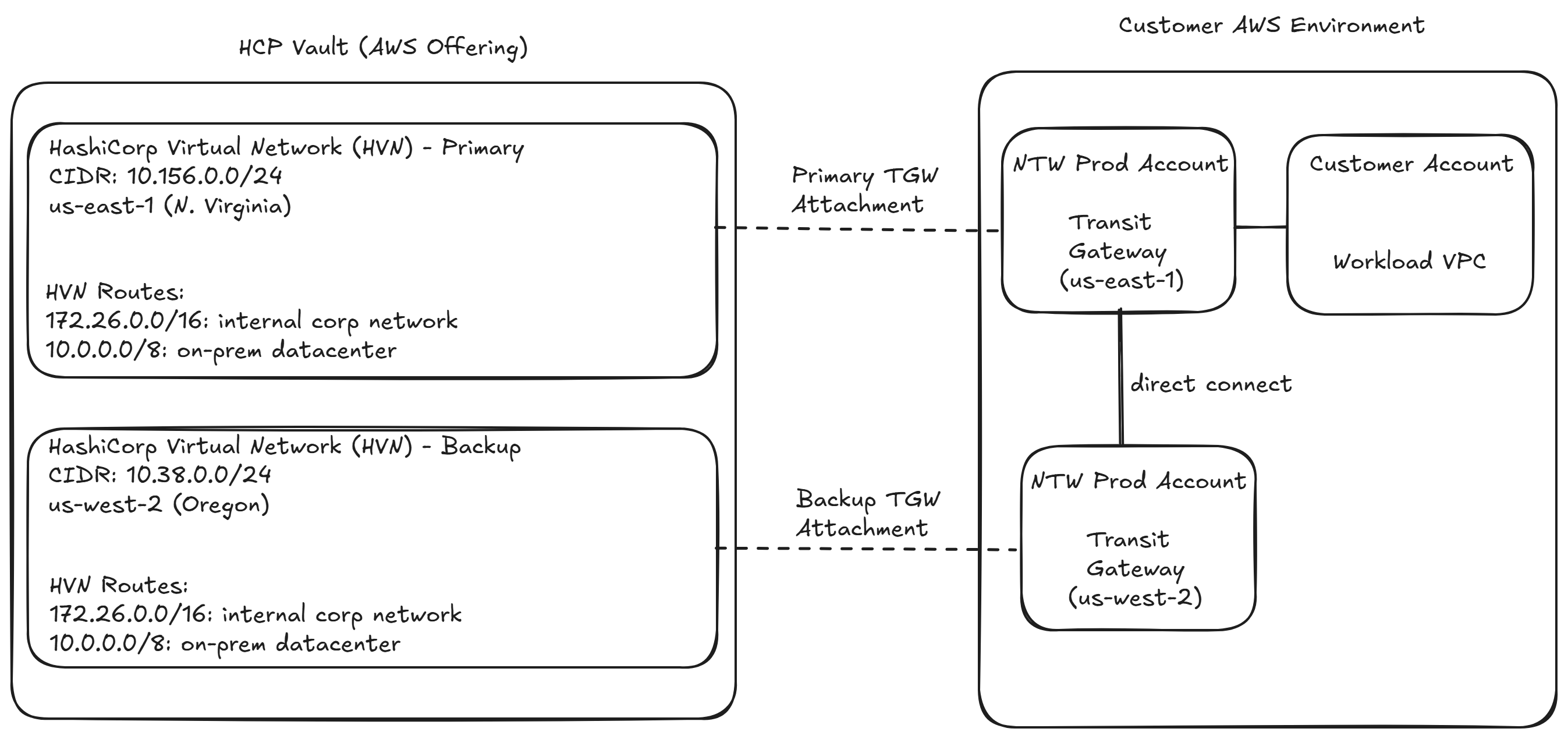
In HCP Vault, there are two main connectivity options: VPC peering or Transit Gateway (TGW) attachment. The latter is more robust from a manageability and usability standpoint, so I opted for this approach. As is typical in large companies, the customer had a siloed org structure, where each team is responsible for a specific function. In my case there was a central network team that was responsible for networking, including TGW management. For example any modifications to the TGW route table, which is necessary for a successful integration, needed to be coordinated with them.
In order to hook up HCP Vault with the customer’s existing TGWs, I needed to perform a TGW attachment. However in order to do this, I needed two things from the customer network team:
- a) the transit gateway ID
- b) they needed to RAM share the TGW, and provide me its ARN
Both are obvious and straightforward pieces, but there’s a bit more to it! Hint: it’s a chicken and egg situation.
The Missing Piece
In order to create a RAM share of a TGW, you need the destination AWS account number. For this project, the customer network team would be RAM sharing an existing TGW that was sitting in their own AWS account. In order to do that, they needed the destination AWS account number which is owned by HashiCorp. The problem? It’s not well documented, at least not in the product docs.
How I solved it
It took some trial and error. At this juncture of the project, I had developed the terraform module according to the customer specs and had the deployment pipeline ready to go. I also had all the inputs required for the pipeline, except the ARN of the RAM shared TGW, since the network team was unable to create it without the missing information.
So I supplied a dummy value for this bit and ran the pipeline, which resulted in an error as expected.
api error IncorrectState: tgw-attach-<redacted> is in invalid state
Next, I decided to look in the terraform state file to see if there were any clues but I didn’t readily have access to it due to insufficient permissions on the S3 bucket. After informing my project stakeholder of next steps, he navigated the org to find someone that could help with the bucket permissions.
I started looking at the json structure in the state file, when something caught my eye, particularly the provider_account_id field. Note, the values have been redacted.
{
      "mode": "managed",
      "type": "hcp_hvn",
      "name": "primary",
      "provider": "provider[\"registry.terraform.io/hashicorp/hcp\"]",
      "instances": [
        {
          "schema_version": 0,
          "attributes": {
            "cidr_block": "<redacted>",
            "cloud_provider": "aws",
            "created_at": "<redacted>",
            "hvn_id": "<redacted>",
            "id": "<redacted>",
            "organization_id": "<redacted>",
            "project_id": "<redacted>",
            "provider_account_id": "<redacted>",
            "region": "<redacted>",
            "self_link": "<redacted>",
            "state": "<redacted>",
            "timeouts": null
          },
I realized that this must be the account owned by HashiCorp, so I relayed this information to the customer network team. They RAM shared their TGW, gave me the ARN, and I punched that into the deployment pipeline as the last missing input.
It then ran successfully on the subsequent attempt! 🎉
data.aws_ec2_transit_gateway.centralized_tgw: Reading...
hcp_hvn.primary: Refreshing state... [id=/project/<redacted>/hashicorp.network.hvn/primary-hvn]
hcp_vault_cluster.hcp-cluster: Refreshing state... [id=/project/<redacted>/hashicorp.vault.cluster/<redacted>]
data.aws_ec2_transit_gateway.centralized_tgw: Read complete after 0s [id=<redacted>]
hcp_aws_transit_gateway_attachment.hcp-vault_tgw_attachement: Refreshing state... [id=/project/<redacted>/hashicorp.network.tgw-attachment/hcp-vault-attachment]

hcp_aws_transit_gateway_attachment.hcp-vault_tgw_attachement: Creating...
hcp_aws_transit_gateway_attachment.hcp-vault_tgw_attachement: Creation complete after 6s [id=/project/<redacted>/hashicorp.network.tgw-attachment/hcp-vault-attachment]
Could the missing piece have been retrieved differently?
Could I have retrieved the provider_account_id from the hcp_hvn resource output directly in Terraform (before looking at the state file), or does the HVN need to be created first to populate that value?
No, this attribute is only available after the HVN is created.